01
Missed call text back
When someone calls and nobody answers, send an immediate text so the conversation has somewhere to go.
Marketing Automation Services · AI · Follow-Up
Zenvo builds targeted automations for follow-up, reviews, events, social media, lead response, reminders, customer communication, and AI — without requiring you to rebuild your entire operation.
[01]Start small
Already have a website, CRM, calendar, or existing process?
Zenvo can often automate one part of the business without replacing everything around it.
Automate one process that is costing time or letting opportunities slip.
Use existing tools where practical instead of replacing them just to add automation.
Add more automation after the first system proves useful.
[02]Lead response
When someone calls and nobody answers, send an immediate text so the conversation has somewhere to go.
Trigger follow-up when someone submits a form, survey, or website inquiry.
Keep leads moving with reminders and follow-up instead of relying on someone remembering every step.
[03]Customer experience
Automatically ask customers for feedback and reviews at the right point in the customer journey.
Confirm appointments, send reminders, reduce no-shows, and make rescheduling easier.
Send useful next-step communication after an appointment, service, purchase, or completed job.
[04]Events
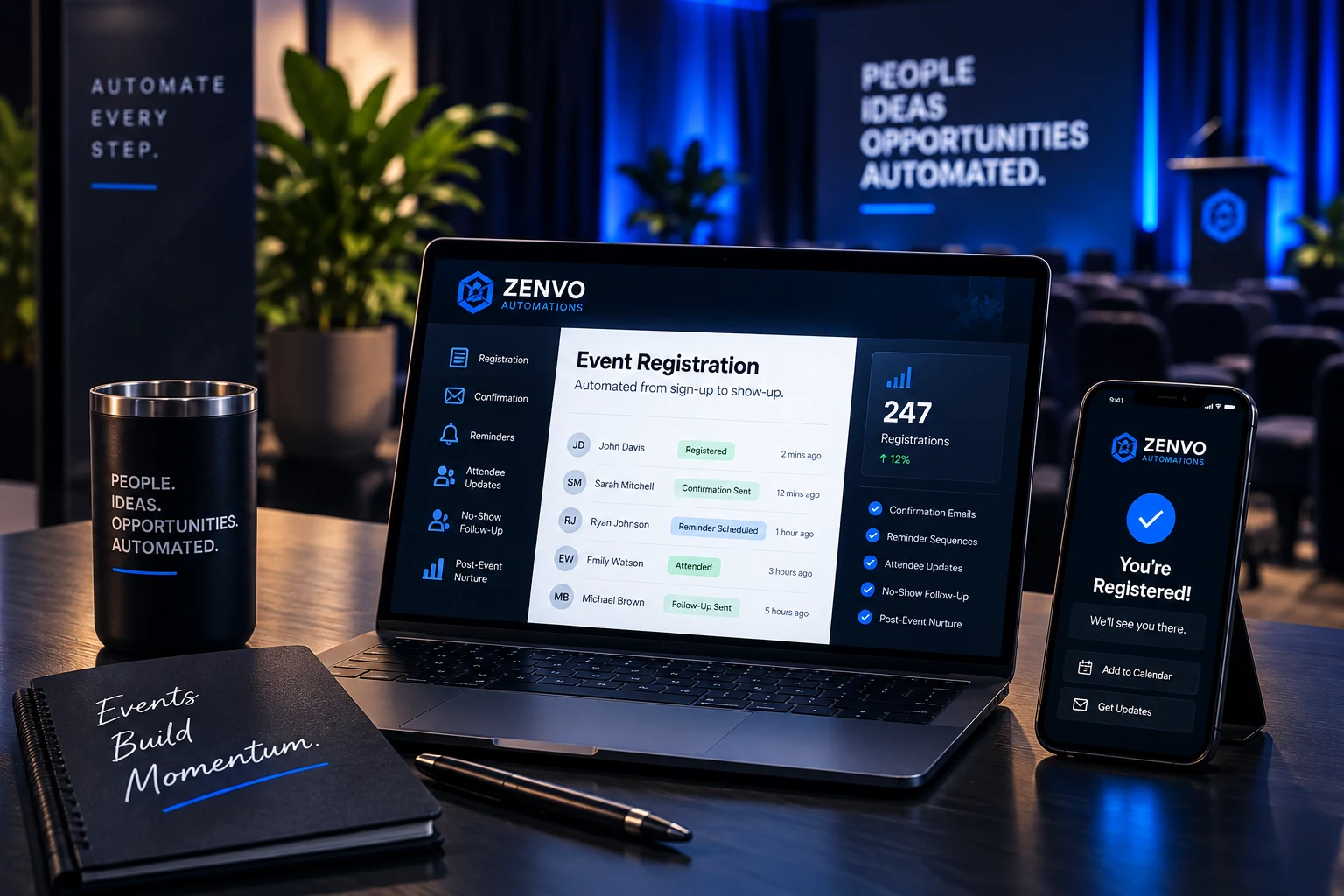
Event automation can handle the communication around the registration — before, during, and after the event.
[05]Marketing operations
Prepare and schedule recurring posts without manually logging into every channel each time.
Social Media Scheduler
Reconnect with older leads or past customers with structured follow-up.
Workflow Automation
Trigger communication based on forms, lists, events, appointments, or customer activity.
Workflow Automation
Automation handles repetition. Your team keeps control of the message.
[06]AI conversations
AI can help handle selected conversations, gather information, answer approved questions, book appointments, and hand the conversation back to your team.
Answer
Qualify
Book
Hand off
You decide where AI helps.And where a person takes over.
[07]AI voice
AI voice can help with selected inbound or after-hours calls when the use case makes sense — answering approved questions, collecting information, or helping move someone toward the next step.
AI voice should support the customer experience — not replace every conversation.
[08]Examples
[09]Need the full system?
If leads, conversations, appointments, ownership, and reporting are scattered across the business, a full CRM setup may make more sense than adding individual automations.
Fix a specific repetitive process.
Build and manage the broader system.
[10]Who this is for
Businesses that want repetitive customer communication handled more consistently.
Businesses managing registrations, reminders, attendees, or recurring events.
Teams spending too much time on reminders, follow-up, data entry, and repetitive communication.
Deeper experience with recruiting, enrollment, lead follow-up, reminders, and longer nurture cycles.
Zenvo works across industries. Transportation is where our operating experience goes deeper.
Built and maintained by Zenvo Automations
This page is written and maintained by Jesse Quintanilla, founder of Zenvo Automations. Jesse works directly with businesses on websites, local search visibility, CRM systems, lead management and marketing automation.
The recommendations here are based on the same systems and processes Zenvo uses when working with clients. About Zenvo
[11]Common questions
No. Zenvo can often automate a focused process around the tools you already use without rebuilding the entire operation.
Often, yes. We first look at your current website, calendar, CRM, forms, and communication tools to see what can connect practically.
Yes. Starting with one repeated process is often the clearest way to prove value before expanding.
Yes. Follow-up can use text, email, or both when those channels fit the process and the customer experience.
Yes. Review requests can be triggered at an appropriate point after an appointment, service, purchase, or completed job.
Yes. Registrations can trigger confirmations, reminders, attendee updates, no-show follow-up, and post-event communication.
Yes, when the use case is appropriate and a connected calendar has the right availability and booking rules.
Yes. The system can hand selected conversations back to your team when judgment or a personal response is needed.
Yes, for selected inbound and after-hours use cases where approved answers, information gathering, and clear escalation rules can support the customer experience.
Zenvo can evaluate whether targeted automation should expand or whether CRM Setup & Management is the better next step.
[12]Ready when you are
Tell us what keeps getting repeated, delayed, or forgotten. We’ll look at whether automation can make it simpler.